
This guide explains how to access a Shifter static site in a subdirectory through a reverse proxy on your own server.
Objective:
Enable visitors to access content located in a subdirectory of a Shifter website using an external server (e.g., EC2) and a domain name (e.g., example.com).
Redirect Structure:
- External Server:
https://www.example.com - Shifter (※):
https://abc123.on.getshifter.io/subdir/
* Subdirectory settings must be enabled, andsubdiris the name of the target subdirectory.
Requirements:
- The Shifter site URL (e.g.,
abc123.on.getshifter.io) - Subdirectory configuration must be enabled in Shifter
- Nginx for reverse proxy
Shifter Configuration
- Copy the URL of your static site in Shifter. You can find it on the live page.
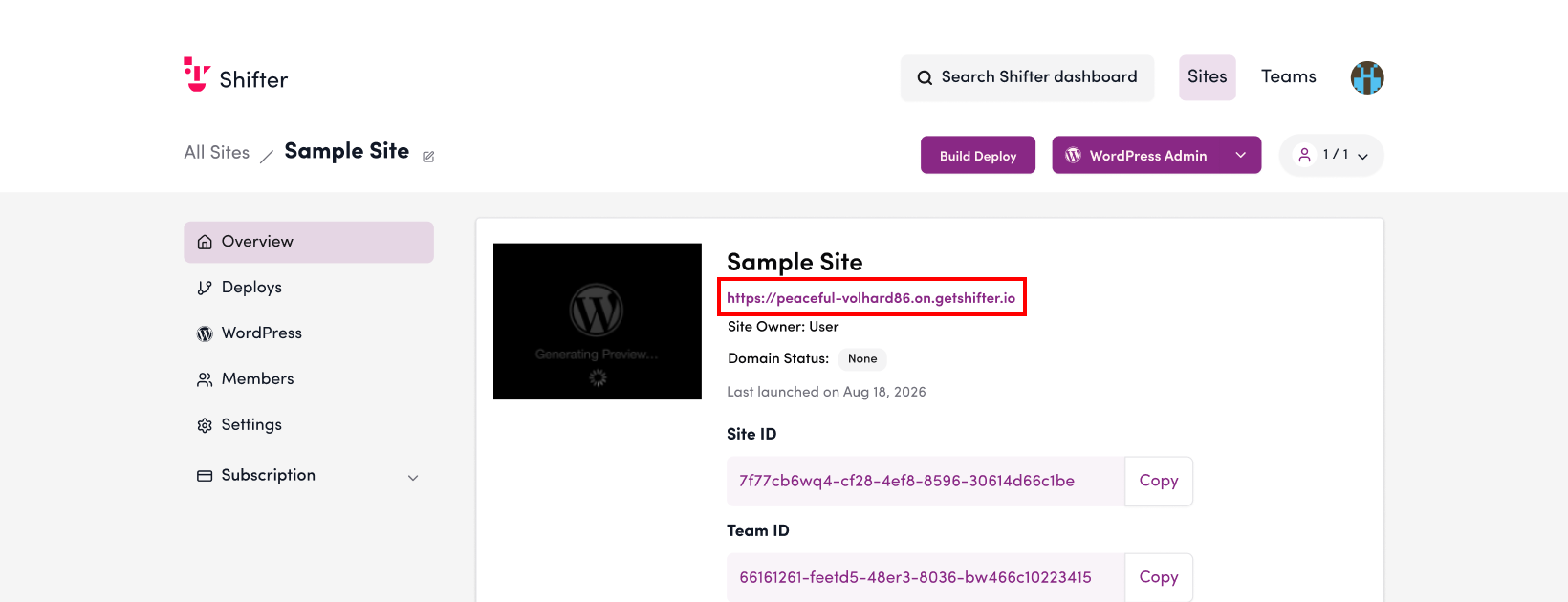
- Verify that subdirectory configuration is enabled.If it is not enabled, refer to the support document “Subdirectory Deployment.”
Example Nginx Configuration (ver. 1.17.10)
Use `proxy_set_header` to ensure the correct Host header is forwarded.
resolver 8.8.8.8 valid=10s ipv6=off;
server {

[...omitted...]


    location ~ /subdir/ {
        proxy_read_timeout      300;
        proxy_connect_timeout   300;
        proxy_redirect          off;
        set $cloudfront_distribution YOUR-SHIFTER_URL.ON.GETSHIFTER.IO;
        proxy_pass              https://$cloudfront_distribution;
        proxy_ssl_name $cloudfront_distribution;
        proxy_ssl_server_name on;
        proxy_set_header        X-Forwarded-Proto       $scheme;
        proxy_set_header        Host                    $cloudfront_distribution;
        proxy_set_header        X-Real-IP               $remote_addr;
        proxy_set_header        X-Forwarded-Host        $http_host;
        proxy_set_header        X-Forwarded-Server      $host;
        proxy_set_header        X-Forwarded-For         $proxy_add_x_forwarded_for;
    }
}