

Dear Shifter User, Thank you for your continued support of Shifter.
We are pleased to announce the renewal of the Shifter management dashboard. This update addresses feedback such as “it’s hard to find the settings I need” and “the same items appear in multiple places,” delivering a more intuitive and streamlined experience.
Overview
This renewal focuses on helping you reach what you want to do as quickly and effortlessly as possible. Your existing data and settings remain completely unchanged.
Key Improvements
Redesigned Site Navigation Menu
Menu items have been restructured with clearer, more intuitive labels:
| Before | After |
|---|---|
| Staging | Deploys |
| Dev | WordPress |
| Team | Members |
| Live | Merged into Settings |
Users unfamiliar with Shifter-specific terminology can now navigate to the features they need with ease.
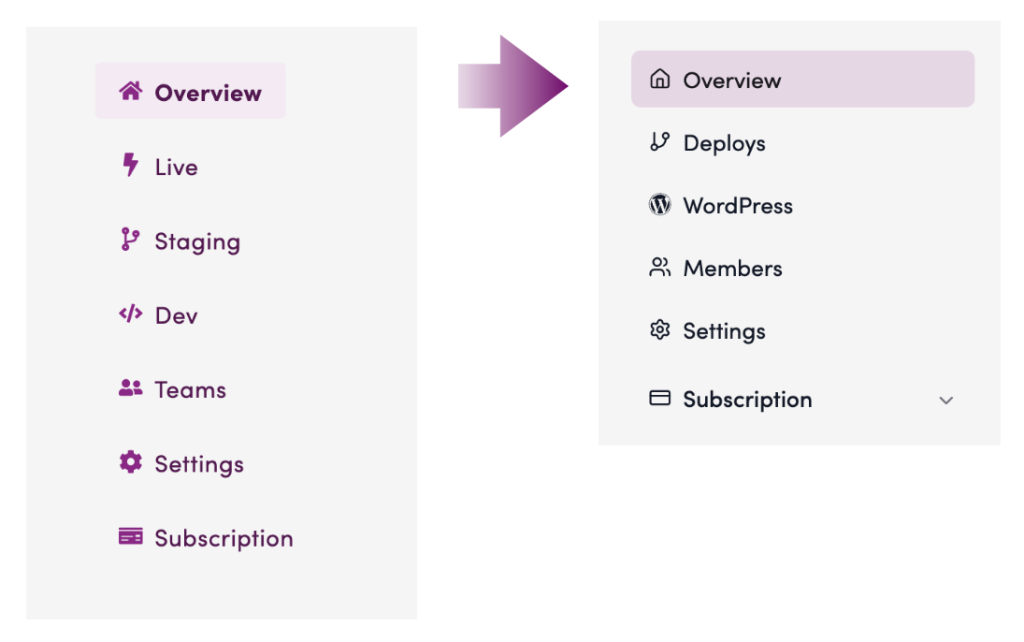
Improved Hierarchical Navigation
Previously, sub-pages were only visible after opening a parent page. Now, clicking on a menu item with sub-pages will expand its links inline — eliminating unnecessary navigation steps and getting you to your destination faster.
Consolidated Team Detail Page
The team detail pages, which previously contained limited information spread across multiple views, have been consolidated into a single page to reduce management overhead.
Optimized Information Layout
Information previously scattered across multiple screens has been reorganized and duplicate entries have been removed:
- Summary section consolidation: Two separate site overview UI elements have been merged into one
- Usage graphs: Moved to the overview page with a tab-based layout, displaying only the information you need
- Auto-publish settings: Three separate settings locations have been unified into one
Other notable update
- “Guide” has been renamed to “Documentation” and, along with “Contact,” has been moved to the menu that appears when clicking the avatar icon on the right side of the navigation
Unified Terminology and Enriched Descriptions
- “Deploy” has been standardized to “Generate Artifacts” / “Generate”
- “Staging” terminology has been unified across both Japanese and English interfaces
- Descriptions for each setting have been expanded for clarity (e.g., notification email settings now read: “Get notified when your plan’s transfer volume or storage limit is approaching”)
- Site billing and account billing are now clearly separated
Performance Improvements via Optimized Data Loading
Data loading that previously occurred during page transitions has been optimized, resulting in smoother navigation throughout the dashboard and faster access to your content.
General UI Enhancements
Overall UI consistency has been improved for a more intuitive experience across the board.
Background and Purpose
This renewal was primarily driven by a commitment to improving user experience (UX):
- Faster access to key information: Important details are now consolidated, reducing the time needed to find what you’re looking for
- Reduced confusion: Intuitive menu labels and clear descriptions enable you to reach your intended action in the fewest steps possible
What You Need to Know
This update focuses on improvements to the management dashboard.
- No data migration or configuration changes are required
- All existing features remain fully available
- There is no impact on your WordPress sites
Simply log in to the renewed dashboard to get started.
Getting Started
Log in to experience the new Shifter Dashboard from the link below.